
Microsoft has recently added additional permissions to be secured in protected actions. Protected actions is a feature that is intended to be assigned to a strong conditional access policy. Protected actions is a set of permissions that can be assigned to conditional access policies.
Is protected actions an additional layer of security?
In my perspective, protected actions is an additional layer of protection. When you have a conditional access policy with protected actions, users that are trying to perform a privileged task, must satisfy for a conditional access policy assigned to that permission of the privileged task. For example, require a strong authentication. Users will only be promted when needed, because the conditional access policy with protected actions only occours when the users tryies to perform a procted action, and not at rule activation or sign-in.
Microsoft is adding more and more permissions to protected actions. Most recently, Microsoft added cross-tenant access settings, but it does also contain permissions for managing conditional access policies itself and network locations.
Below shows the exact permissions at the moment:
| Permissions | Description |
| microsoft.directory/conditionalAccessPolicies/ basic/update |
Update basic properties for Conditional Access policies |
| microsoft.directory/conditionalAccessPolicies/ create |
Create Conditional Access policies |
| microsoft.directory/conditionalAccessPolicies/ delete |
Delete Conditional Access policies |
| microsoft.directory/conditionalAccessPolicies/ basic/update |
Update basic properties for conditional access policies |
| microsoft.directory/conditionalAccessPolicies/ create |
Create conditional access policies |
| microsoft.directory/conditionalAccessPolicies/ delete |
Delete conditional access policies |
| microsoft.directory/crossTenantAccessPolicy/ allowedCloudEndpoints/update |
Update allowed cloud endpoints of the cross-tenant access policy |
| microsoft.directory/crossTenantAccessPolicy/ default/b2bCollaboration/update |
Update Microsoft Entra B2B collaboration settings of the default cross-tenant access policy |
| microsoft.directory/crossTenantAccessPolicy/ default/b2bDirectConnect/update |
Update Microsoft Entra B2B direct connect settings of the default cross-tenant access policy |
| microsoft.directory/crossTenantAccessPolicy/ default/crossCloudMeetings/update |
Update cross-cloud Teams meeting settings of the default cross-tenant access policy. |
| microsoft.directory/crossTenantAccessPolicy/ default/tenantRestrictions/update |
Update tenant restrictions of the default cross-tenant access policy. |
| microsoft.directory/crossTenantAccessPolicy/ partners/b2bCollaboration/update |
Update Microsoft Entra B2B collaboration settings of cross-tenant access policy for partners. |
| microsoft.directory/crossTenantAccessPolicy/ partners/b2bDirectConnect/update |
Update Microsoft Entra B2B direct connect settings of cross-tenant access policy for partners. |
| microsoft.directory/crossTenantAccessPolicy/ partners/create |
Create cross-tenant access policy for partners. |
| microsoft.directory/crossTenantAccessPolicy/ partners/crossCloudMeetings/update |
Update cross-cloud Teams meeting settings of cross-tenant access policy for partners. |
| microsoft.directory/crossTenantAccessPolicy/ partners/delete |
Delete cross-tenant access policy for partners. |
| microsoft.directory/crossTenantAccessPolicy/ partners/tenantRestrictions/update |
Update tenant restrictions of cross-tenant access policy for partners. |
| microsoft.directory/namedLocations/basic/ update |
Update basic properties of custom rules that define network locations |
| microsoft.directory/namedLocations/create | Create custom rules that define network locations |
| microsoft.directory/namedLocations/delete | Delete custom rules that define network locations |
| microsoft.directory/resourceNamespaces/ resourceActions/authenticationContext/update |
Update Conditional Access authentication context of Microsoft 365 role-based access control (RBAC) resource actions |
A relevant question can be asked – isn’t privileged identity management(PIM) enough? Not in my opinion. A conditional access policy can also target role activation by PIM, but the difference between PIM and protected actions is, that a conditional access policy for PIM enforces a user to activate a specific role, where when a user does high impact action, a conditional access policy with protected actions is enforced idenpendent of a user role.
A combination of both, enhances a stronger security.
Now, let’s deep into the configuration.
Prerequisites
To add or remove protected actions:
- Microsoft Entra ID P1 or P2 license
- Conditional Access Administrator or Security Administrator role
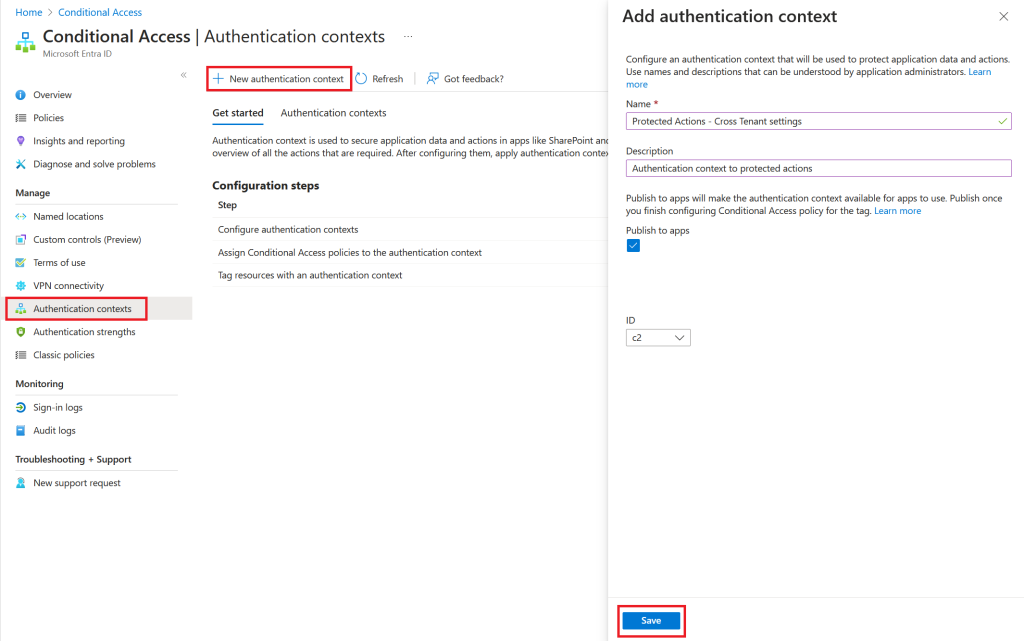
Step 1 – Configure an Authentication Context
Go to https://entra.microsoft.com
Navigate to Protection Conditional Access/Authentication Context/New authentication context
Select appropiate name and click save
Step 2 – Create a conditional access policy associated with authentication context
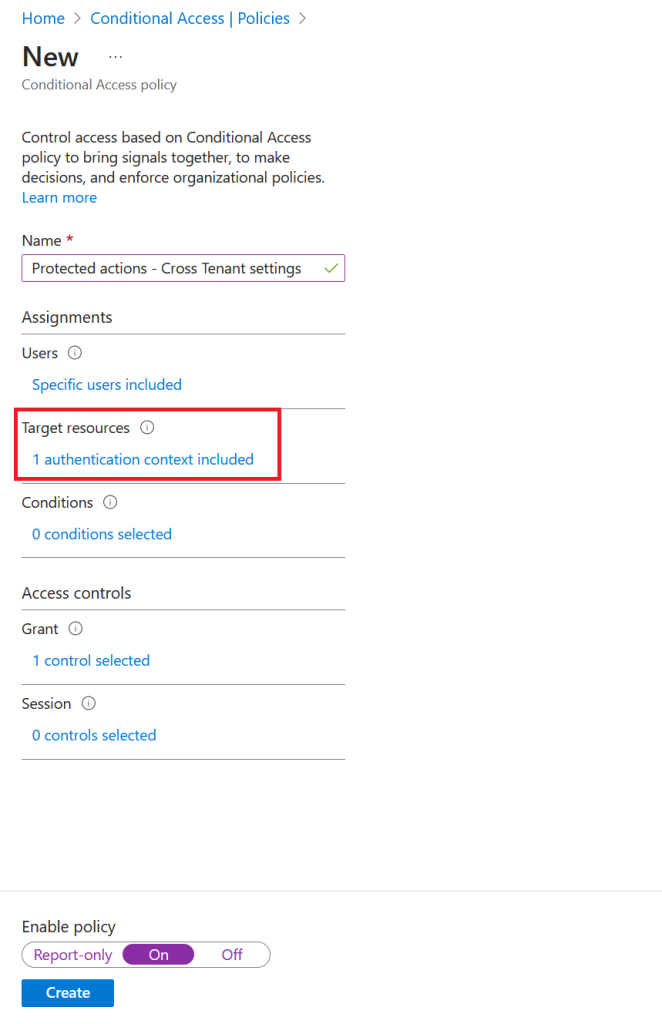
Navitage to Protection Conditional Access/New Policy

Select name according to your naming standards
Assign privileged users, groups or directory roles
NB: Remember to exclude break-glass accounts
Set the target resource to our newly created authentication context
Last, grant a strong authentication control like passwordless or phishing authentication strength
Step 3 – Add protected actions
Navitage to Identity Roles & Admins/Protected actions/Add protected actions
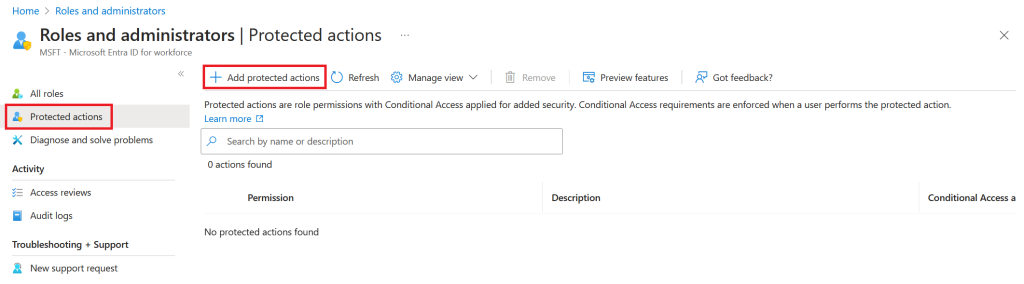
Choose our newly created authentication context
Now, Select permissions
In our scenario where we are going to secure cross tenant settings, we select all permissions related to cross tenant policies
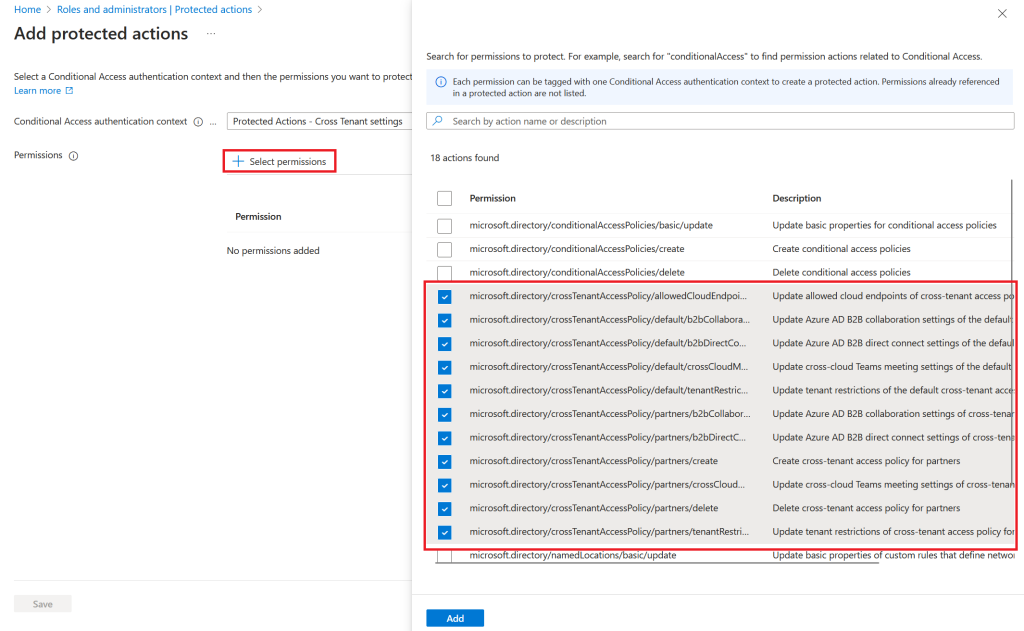
NB: It is important to implement conditional access authentication context with protected actions in the order above. Else, it can give you errors such as getting repeated request to reauthenticate
Step 4 – Let’s test it out
Now, it is time to verify that our user will be triggered by the conditional access authentication context policy when trying to edit cross tenant settings
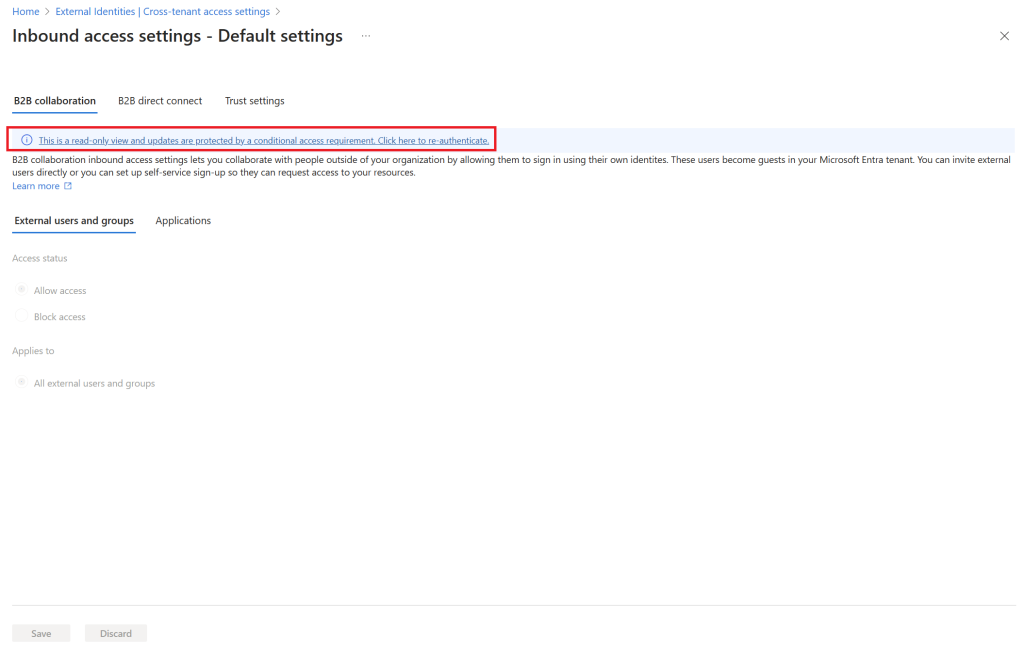
Summarize
We have now added an additional layer of protection for cross tenant policies. My example is just one area where you can add protected actions. My expectations is, that more and more settings are going to be added to the protected actions permissions. Applying further features to conditional access policies proves that we need to think conditional access policies as a modern firewall, and protected actions is a feature I really like.
 Sebastian Henriksen